Blue Ink Design Elements: A Digital Toolkit for Authentic Creations
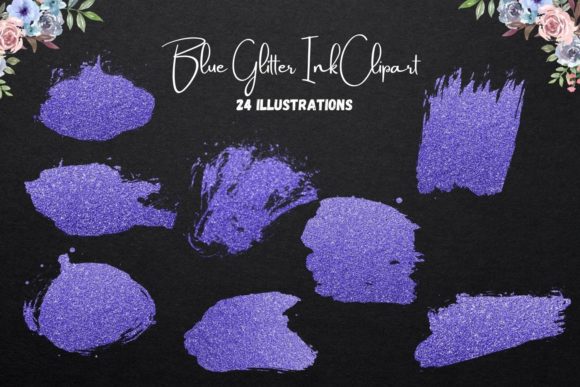
There is a specific, tactile memory attached to the act of writing with a fountain pen or a high-quality gel pen on textured paper. It represents a level of care and deliberation that is often lost in the pixel-perfect, sterile environments of modern digital design. As a designer, I am constantly looking for assets that bridge that gap—tools that allow for the precision of digital editing while retaining the soul of human touch. That is exactly what you find with Blue Ink Design Elements. This collection of 24 PNG files captures the fluidity, slight imperfections, and rich saturation of actual ink, offering a distinct aesthetic that stands apart from standard vector graphics.
The Aesthetic: More Than Just a Color
When we talk about Blue Ink Design Elements, we are discussing a specific visual personality. The appeal lies in the "bleed" and the texture. Unlike a flat vector shape, these elements carry the grain of the paper they were inspired by and the varying opacity of a pen stroke. This is crucial for anyone working in editorial design or brand identity. We have moved past the era where "digital" meant "plastic." Modern audiences crave authenticity. The visual weight of these elements suggests a handmade quality, which subconsciously signals trust and personal connection to the viewer.
The color choice—blue—is not arbitrary. In color psychology, blue conveys stability, calm, and professionalism. However, "blue ink" specifically mimics the institutional reliability of a signature or a contract, mixed with the creative flow of a journal entry. This makes the assets incredibly versatile. They don't scream for attention like neon graphics; they invite the viewer in with a sophisticated, understated elegance. Whether you are working on a modern typography layout or a vintage-inspired packaging design, these elements add a layer of depth that flat colors simply cannot achieve.
Practical Applications: From Screen to Print
The utility of Blue Ink Design Elements spans a massive range of projects because of their technical specifications. Being 300 dpi, RGB, and transparent PNGs, they are ready for almost any medium you throw them at.
For the Entrepreneur and Marketer:
If you are building a brand identity, consistency is key. Using these ink elements as accent graphics on your website, in your email headers, or as background textures can unify your look. For social media graphics, where the scroll-speed is fast, a handwritten flourish or an ink splash can stop the thumb. It breaks the grid of a standard Instagram feed. It works exceptionally well for coaches, writers, and lifestyle brands that want to emphasize the "human" side of their business.
For the Crafter and Hobbyist:
The prompt mentions digital scrapbooking and planner printables, and this is where the 5" x 5" sizing is genius. It is a manageable size that can be tiled or centered easily. For journal cards, these elements provide instant decoration without the mess of actual ink. You can print them onto sticker paper to create custom planner dashboards or use them to embellish photo albums. Because the background is transparent, you can layer them over patterned papers or photographs seamlessly.
For Gift Making and Merchandise:
The suggestion to use these for teacher gifts, such as mugs or t-shirts, highlights a commercial opportunity. Sublimation printing and heat transfer vinyl projects often struggle with complex backgrounds. With transparent PNGs, you can isolate the ink design and place it on a curved mug surface or a textured tote bag. The design looks like it was drawn directly onto the fabric or ceramic. It is a premium touch that elevates a simple gift into a custom piece of art.
Strategic Design: How to Use Ink Elements Effectively
Using Blue Ink Design Elements effectively requires a bit of strategy to ensure they enhance rather than clutter your work. Here is how to approach them from a professional standpoint:
- Visual Hierarchy and Focal Points: Use these elements to guide the eye. An ink arrow or a scribbled circle draws attention to a specific call-to-action (CTA) on a flyer or a key quote in a blog post. Because they mimic hand-drawn gestures, they feel like a personal annotation from the creator to the reader.
- Font Pairing: This is critical. Do not pair these handwritten, organic elements with overly rigid, geometric sans-serif fonts unless you are going for a high-contrast industrial look. Instead, pair them with a clean serif font for a classic editorial feel, or a friendly sans serif font to keep the layout airy. The ink elements act as the "script" accent, so you may not need an additional script font for your headlines, which can often improve readability.
- Texture and Depth: Instead of using a full element, try using a brush stroke as a texture mask over text or images. This creates a "distressed" look that is very popular in web design and packaging design right now. It adds grit and realism to otherwise smooth digital surfaces.
- Negative Space: Do not fear the empty space. These ink elements are bold. Let them breathe. A single ink splatter in the corner of a business card is more sophisticated than a border of ink splatters surrounding the text.
Technical Integration and Workflow
One of the biggest pain points for non-designers is dealing with file formats. The fact that this set comes as PNGs with transparent backgrounds removes the need for complex clipping paths or "knockout" settings in your design software. Whether you are using Canva, Adobe Photoshop, or Illustrator, you simply drag and drop.
However, a word of advice on color management: While the files are provided in RGB (which is best for screens), if you are sending these to a professional offset printer for high-end editorial design or brochures, you will need to convert them to CMYK. Blue ink often translates well to print, but always request a proof. The nuance of the ink texture can sometimes get lost if the resolution is downsampled, so keep them at their native 300 dpi whenever possible.
For those creating planner printables or digital scrapbooking pages, consider the opacity. In your software, you can lower the opacity of these elements to create a watermark effect. This allows you to layer text over the top of a heavy ink splash without sacrificing the legibility of your content. This technique is excellent for creating background layers in wall art or invitations.
Final Thoughts on Creative Assets
In a marketplace flooded with generic stock vectors, Blue Ink Design Elements offer a refreshing return to craftsmanship. They are not just images; they are textures and moods. They allow content creators and small business owners to inject personality into their digital footprints without commissioning expensive custom illustrations.
Whether you are designing a wedding invitation, mocking up a t-shirt for a teacher's gift, or building out a cohesive social media strategy, these assets provide the flexibility and quality needed for professional results. They bridge the gap between the digital workspace and the analog world, reminding us that even in a digital age, the stroke of a pen carries weight. By integrating these elements thoughtfully, you ensure your designs feel personal, intentional, and deeply human.